Dental Practice Software Conversion: What Buyers Need to Know

Co-Founder, Minty Dental
In Summary
- Most conversions are forced by multi-location buyers needing unified systems, integration incompatibility between existing and acquired software, or legacy platforms on unsupported hardware that can't be maintained
- Staying on incompatible systems costs more than converting—expect dual subscription fees, manual data entry between platforms, and workflow friction that compounds monthly
- Software evaluation belongs in due diligence, not after closing—once you own the practice, the seller has no obligation to help with migration issues or provide access to historical data you didn't verify upfront
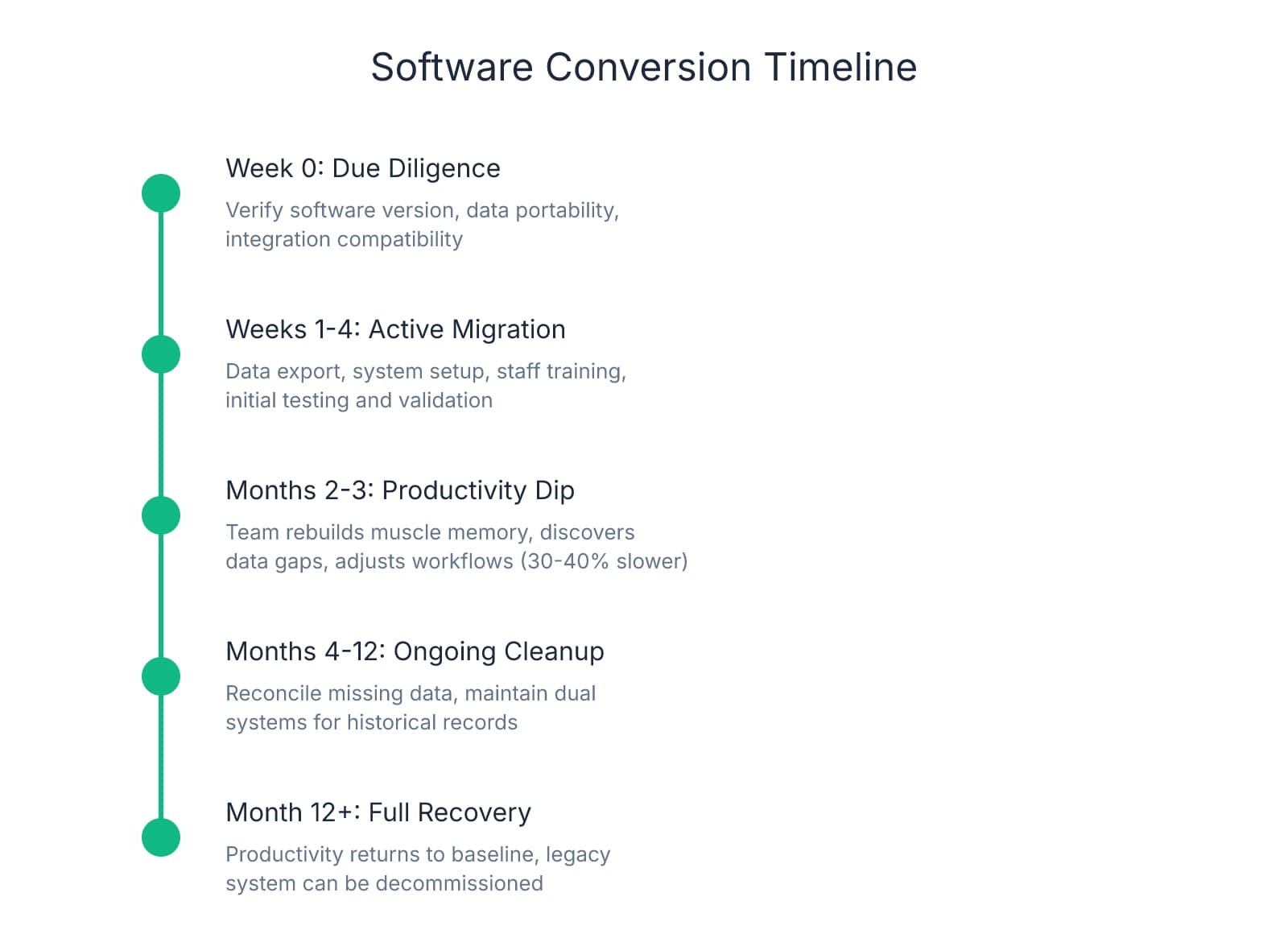
- Plan for 2-4 weeks of active conversion work plus 2-3 months of reduced productivity as your team rebuilds muscle memory and discovers which data didn't transfer cleanly
Software Conversion Isn't Optional When the System Can't Support Your Practice
Many buyers approach software as a post-closing decision. That assumption breaks down when the seller's practice management system can't support how you actually operate.
Three scenarios force conversion. Multi-location buyers need unified reporting, centralized scheduling, and consolidated patient records across sites. Running two systems means maintaining separate subscriptions, training staff on both platforms, and manually reconciling financial data monthly. One buyer spent $18,000 annually on duplicate licenses before migrating—money that could have funded the conversion itself.
The second scenario surfaces when your existing tools don't integrate with the seller's system. If you rely on specific imaging software, patient communication platforms, or billing services that won't connect to the acquired practice's PMS, you're choosing between abandoning tools that work or running parallel systems indefinitely. The cost isn't just subscriptions—it's the labor hours your team spends transferring data manually.
The third scenario is harder to spot during walkthroughs: legacy software running on unsupported operating systems. Practices still operating on Windows 7 or server-based systems requiring on-site hardware face a hard deadline. When that server fails or the vendor ends support, you're converting under pressure with no time to plan. Evaluating equipment age during due diligence helps surface these risks before they become emergencies.
The hidden cost of delaying conversion is operational friction that builds every month you run incompatible systems. Your front desk enters patient updates twice. Your hygienists can't access treatment plans created in the other location. Your accountant reconciles reports from two platforms manually. Productivity drops 30-40% in the first few months as staff navigate workarounds.
This is why software evaluation belongs in due diligence. Once you own the practice, the seller has no obligation to help with data migration, explain custom configurations, or provide access to historical records you didn't verify upfront. Questions about software compatibility and data portability should sit alongside financial review and lease terms.
The timeline reality: most conversions take 2-4 weeks of active work, but productivity doesn't recover for 2-3 months. Your team needs time to rebuild muscle memory, discover which data didn't transfer cleanly, and adjust workflows around the new platform. That's 200-300 hours of cleanup in the first year. If you're buying a practice generating $80,000 monthly, even a 20% productivity dip for two months costs $32,000 in lost output.
The Three Hidden Costs That Show Up Months After Migration
Patient demographics transfer cleanly. Treatment plans, fee schedules, and clinical notes often don't. That gap between what migrates and what gets lost is where the real cost sits.
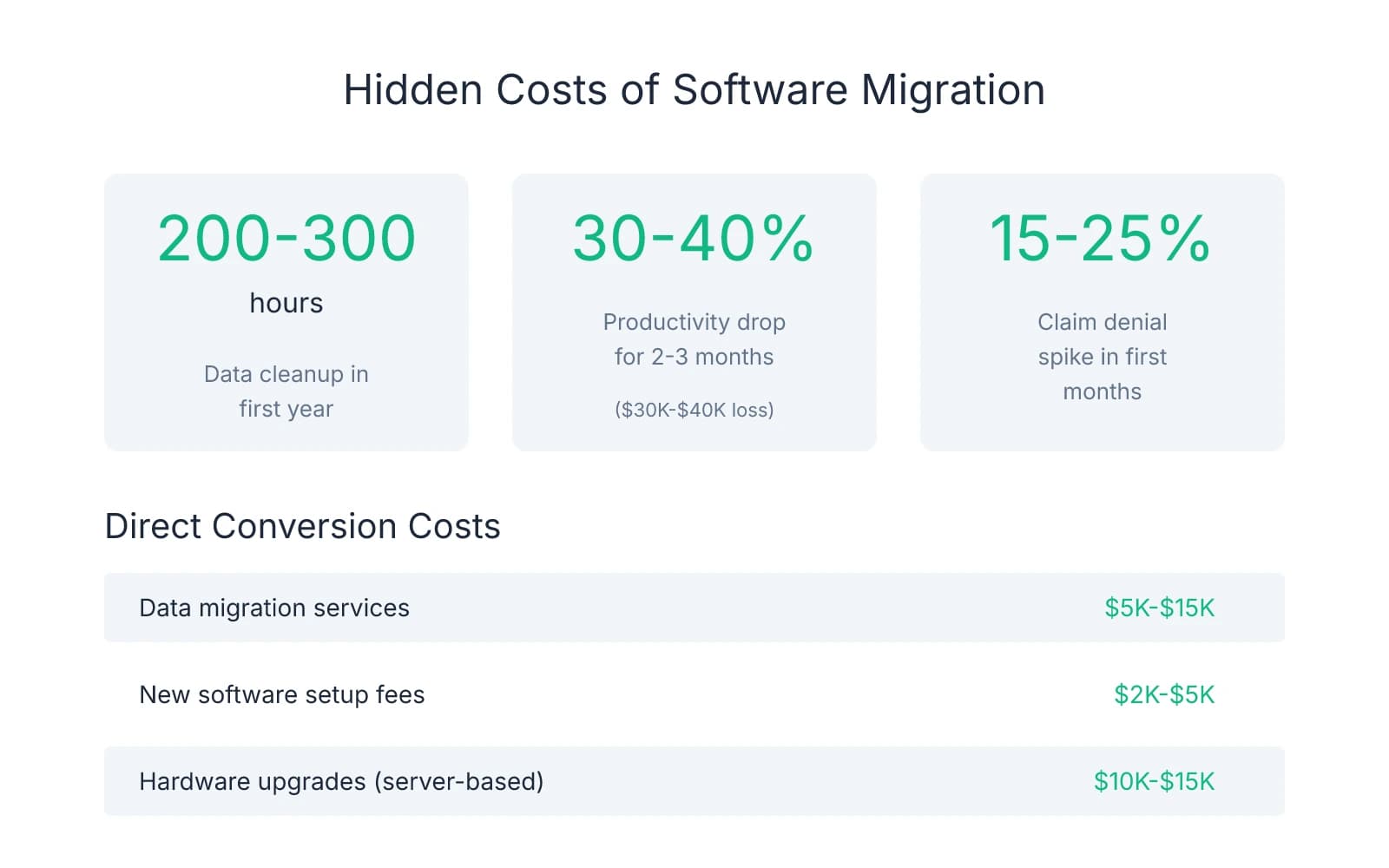
The data graveyard problem starts small. A patient calls about a treatment plan from March. Your front desk pulls up the record. The plan isn't there. Someone logs into the old system—which you're still paying for because you can't fully shut it down yet—and finds the plan buried in a PDF. Custom fee schedules come through corrupted. Perio charts flatten into unreadable text. Pre-authorized treatment plans vanish entirely. Your team spends 200-300 hours in the first year reconciling what didn't transfer, at $25-$30 per hour in labor cost.
Where buyers get burned is assuming "seamless data migration" means everything transfers. Patient names, contact information, and appointment history migrate reliably. Clinical data—the information that actually drives treatment decisions—often doesn't. One pattern worth paying attention to: practices that relied heavily on custom templates, macros, or non-standard charting formats face the worst data loss.
The productivity curve hits harder than data cleanup. Your hygienist who charted in 90 seconds now needs four minutes. Your scheduler who managed three patients simultaneously can only handle one. Reports that took a single click now require an afternoon and a YouTube tutorial. Productivity typically drops 30-40% for 2-3 months as staff relearn workflows they used to execute without thinking. For a practice collecting $100,000 monthly, that productivity dip equals $30,000-$40,000 in lost output.
What makes this worse is that the productivity loss compounds. Patient flow slows. Phones ring longer. Appointment slots go unfilled because scheduling takes twice as long. The team gets frustrated, which shows up in how they interact with patients. One buyer saw three staff members quit during the conversion window—not because they disliked the new software, but because the daily friction of relearning basic tasks wore them down.
The insurance verification breakdown is the cost most buyers miss entirely. Your front desk knows that Delta Dental in your region requires pre-authorization for anything over $500, but Cigna doesn't. They know which plans cover sealants and which don't. That institutional knowledge lives in your team's heads and in notes scattered through the old system. When you migrate, those notes don't transfer. Practices often see a 15-25% spike in claim denials in the first few months post-migration as the team relearns payer-specific quirks through trial and error.
The dual-system trap extends the cost timeline far beyond migration itself. Many practices pay for both old and new software for 6-12 months because they can't fully shut down the legacy system. Historical records live there. Insurance authorizations reference old claim numbers. Patients call with questions about treatment from two years ago, and the answer sits in the old database. One buyer kept their old system active for 18 months at $400 monthly—$7,200 in redundant software costs that could have funded part of the migration itself.
These costs don't show up on the broker's CIM or the seller's P&L. They surface after closing, when your team discovers what didn't transfer and your collections dip because workflows broke.
Due Diligence Questions That Reveal Migration Risk Before You Close
The time to discover your seller's practice management system runs on Windows 7 is not three weeks after closing. One protection many buyers overlook is treating software evaluation as a financial line item, not an IT afterthought.
Software inventory starts with specifics. Asking "what practice management system do you use?" gets you a brand name. What you need is version number, deployment model, and integration map. Is the system cloud-based or server-dependent? If it's server-based, what happens when that hardware fails? Which imaging software connects to the PMS, and does it require proprietary drivers that won't run on modern operating systems? What clearinghouse handles insurance claims, and does it integrate directly or require manual file uploads? Each integration point is a potential failure point during migration.
Data portability assessment separates what transfers from what gets lost. The critical question isn't whether data exports—it's what format it exports in and how far back historical records go. Can the system generate a full patient database export in CSV or SQL format, or does it only output PDFs? How many years of treatment history, clinical notes, and imaging are accessible? Do custom fields—perio charts, treatment plan templates, fee schedules—export cleanly, or do they flatten into unreadable text? If the seller customized heavily, ask to see a sample export file. What looks complete in the live system often arrives corrupted or incomplete after migration.
Operational dependency mapping reveals where workflows will break. Ask the seller's staff which features they use most—not which ones exist, but which ones they rely on daily. Does the hygienist chart using voice commands that won't exist in your system? Does the front desk use a scheduling view that displays patient insurance eligibility inline, or do they toggle between screens? Are there manual workarounds that signal the current system doesn't actually do what it's supposed to? These workarounds often mean the seller's team already adapted to software limitations. Your team will face the same limitations, plus the learning curve of a new platform.
Red flags that signal expensive migration sit in the details most buyers skip. If the practice runs on an operating system Microsoft no longer supports, you're not just migrating software—you're replacing hardware and rebuilding network infrastructure. If the seller recently migrated themselves, ask what didn't transfer. Their answer tells you which data types are fragile and which workflows broke during their own conversion. If they can't answer—or if they're still paying for the old system a year later—that's the cost trajectory you're inheriting.
The value of these questions isn't just the answers—it's the negotiating position they create. If due diligence reveals the practice runs on a server-based system that requires $15,000 in hardware replacement and 300 hours of data cleanup, that cost belongs in your purchase price discussion. What you negotiate beyond the headline number often determines whether the deal pencils after accounting for technology risk.
How to Structure the Deal When Software Conversion Is Inevitable
Once due diligence confirms migration is unavoidable, the question shifts from whether to convert to who absorbs the cost. Three negotiation structures protect buyers when software risk is material: purchase price adjustment, extended transition support with technology handoff, and earnout tied to migration success.
Purchase price reduction works when you can calculate total conversion cost with reasonable accuracy. Start with direct expenses: data migration services typically run $5,000-$15,000, new software setup fees add $2,000-$5,000, and hardware upgrades for practices leaving server-based systems can hit $10,000-$15,000. Then layer in productivity loss. A practice collecting $100,000 monthly that experiences a 30% efficiency drop for two months loses $60,000 in output. Add dual system subscriptions if you'll need to maintain the old platform for historical access—$400-$600 monthly for 6-12 months equals $2,400-$7,200. Total those line items and you have a defensible number to present during letter of intent negotiations. One buyer documented $42,000 in quantifiable conversion costs and negotiated a $35,000 purchase price reduction.
Where this approach breaks down is when conversion costs are speculative. If you can't verify how much historical data will transfer cleanly or whether the seller's custom fee schedules will survive migration, a fixed price adjustment might underestimate the real cost.
Extended seller transition with software-specific support shifts knowledge transfer risk back to the seller. Technology transition requires different language than standard clinical handoff. The clause should specify seller availability for software questions during business hours, access to the legacy system for data reconciliation (with login credentials maintained for 90-120 days post-closing), and documentation of custom workflows that won't transfer automatically. One protection many buyers find valuable is requiring the seller to walk your team through their most-used features and workarounds during the first two weeks. Transition support that includes technology handoff protects you from knowledge gaps that show up three months after closing when the seller is no longer reachable.
The challenge with this structure is enforcement. If the seller agrees to 60 days of software support but stops answering calls after three weeks, your recourse is limited unless the purchase agreement includes specific penalties for non-compliance.
Earnout structures tied to migration success align seller incentives with your operational continuity. Instead of paying the full purchase price at closing, hold back 5-10% contingent on successful data migration and system stability. Define success with measurable criteria: 95% of active patient records transferred with complete treatment history, zero data loss in fee schedules and insurance contracts, and system uptime above 98% for the first 90 days post-migration. The seller gets the holdback once those benchmarks are met. Earnout structures shift the burden of proof—if migration goes smoothly, the seller gets paid; if it doesn't, you have working capital to cover the cleanup.
The keep-vs-convert decision framework comes down to practice size and integration needs. For single-location practices under $500,000 in annual collections with minimal technology dependencies, absorbing short-term friction often costs less than immediate conversion. If the seller's system works and your team can operate it without major workflow disruption, delaying migration for 12-18 months lets you focus on patient retention and staff stability first. The calculation changes for multi-location buyers, practices with complex imaging workflows, or acquisitions where the existing software can't integrate with tools you already use.
One pattern worth paying attention to: buyers who delay conversion to "save money" often spend more in the long run. Dual subscriptions, manual data reconciliation, and productivity loss compound monthly as outdated systems force staff into time-consuming workarounds. If the math shows conversion is inevitable, doing it in month two instead of month fourteen saves 12 months of operational friction and redundant software costs.
Sources & References
The data and claims in this article are drawn from the following sources. We prioritize government data, peer-reviewed research, and established industry publications to ensure accuracy.
- How Complex Is Dental AI Platform Migration? | Overjet— overjet.com
- How Complex Is Dental AI Platform Migration? | Overjet— overjet.com
- 3 Hidden Costs of Dental Software Migration (That No One Tells You ...— www.linkedin.com
- Dental Practice: A Smart Guide to Replacing Outdated Software ...— learn.flex.dental
Frequently Asked Questions
Ready to acquire your ideal dental practice?
Whether you're navigating software conversion challenges or evaluating practice technology during acquisition, Minty Plus provides expert guidance through every step of the buying process. Our team helps you assess technology fit and manage post-close integration seamlessly.