What Information Should Be on a Dental Practice Website

Co-Founder, Minty Dental
In Summary
- Over 75% of patients judge a practice's credibility based on website design before making contact, making the site a critical trust signal during acquisition evaluation
- A practice's digital presence reveals operational priorities: mobile responsiveness, current information, and local search visibility indicate whether the seller invested in patient acquisition infrastructure
- Weak websites represent immediate post-closing opportunity but also signal work you'll inherit—outdated contact information or broken booking systems suggest broader neglect
- Practices with online scheduling attract different patient demographics than phone-only offices, affecting both revenue potential and the transition workload you'll face
- During due diligence, evaluate the website as a diagnostic tool for operational health, not just a marketing asset
A Strong Website Reflects How the Practice Operates
When you walk through a practice during due diligence, you notice the condition of the operatories, the organization of patient files, the cleanliness of the waiting room. The website deserves the same scrutiny—it's a window into how the seller approached patient acquisition, operational investment, and basic maintenance.
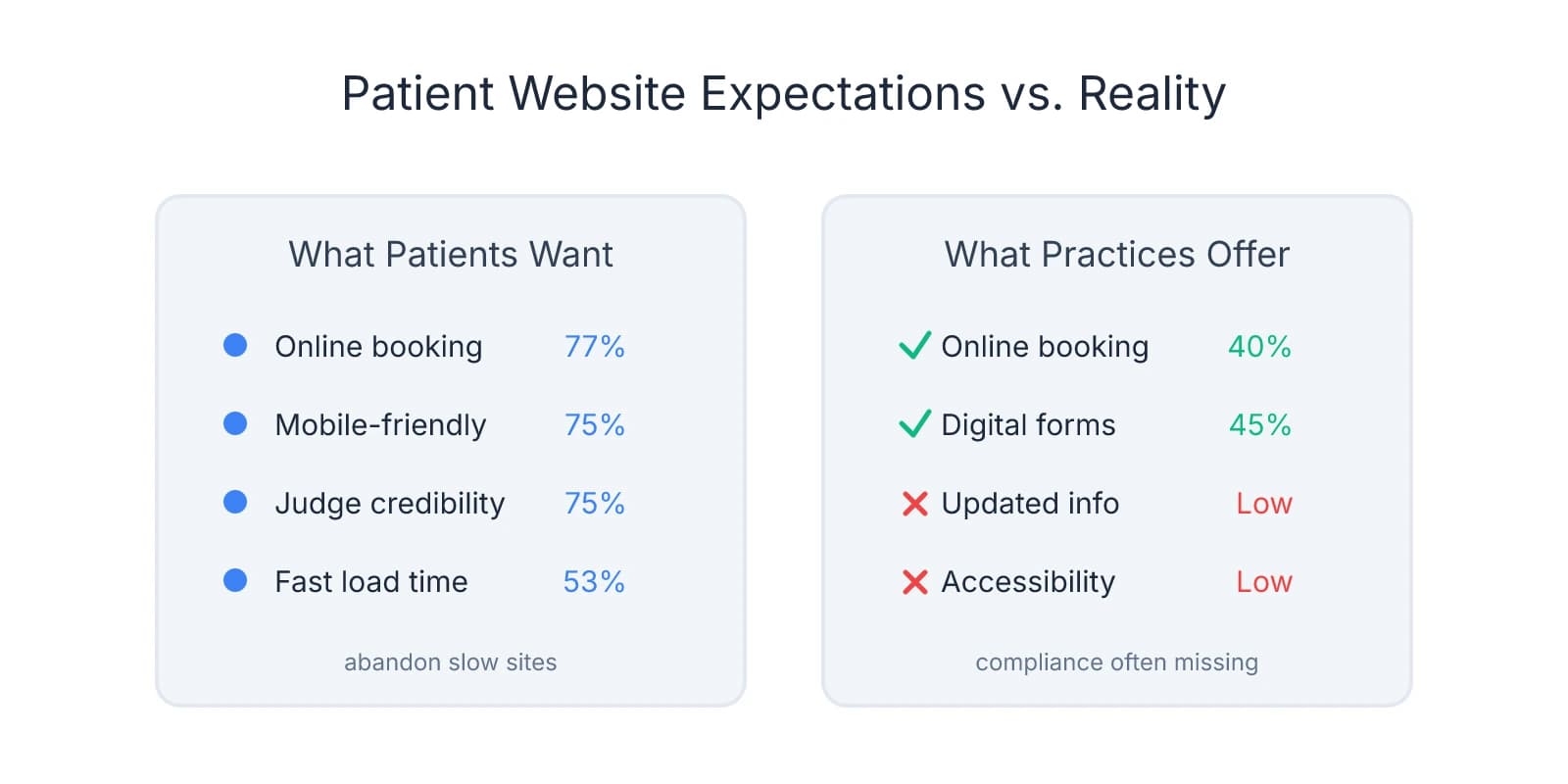
Over 75% of patients judge a practice's credibility based on website design before they pick up the phone. A neglected site isn't just costing new patient opportunities—it's actively repelling them. If the homepage lists a phone number that forwards to the seller's cell, or the "Meet the Team" page features staff who left two years ago, you're looking at a practice that hasn't prioritized patient experience. That pattern often extends beyond the website.
Pull up the site on your phone and navigate as a prospective patient would. Does the layout adjust cleanly to mobile, or do you need to pinch and zoom? Google reports that 53% of mobile users abandon sites that take longer than 3 seconds to load, and most dental searches happen on mobile devices. A slow, desktop-only site signals the practice hasn't kept pace with how patients search for care.
Test local search visibility. Search "[city] dentist" or "dentist near me" and see where the practice ranks. If it doesn't appear on the first page, the seller either hasn't invested in local SEO or the website lacks the technical foundation to compete. That's not disqualifying—it's an opportunity—but it tells you patient acquisition has relied on referrals or legacy reputation rather than active digital strategy.
Check whether information is current. Outdated hours, incorrect addresses, or dead links to insurance pages suggest the site hasn't been touched in months or years. These create friction for patients trying to book appointments and often correlate with other operational gaps you'll discover deeper into due diligence. When evaluating the practice's overall health, consider questions that reveal whether the seller maintained systems or let them drift.
Pay attention to functionality that reveals patient expectations. Does the site offer online scheduling, or is the only option a phone call during business hours? Practices with integrated booking systems tend to attract younger, digitally-native patients who expect convenience. Phone-only practices may serve an older demographic less comfortable with technology. Neither is better, but the infrastructure you inherit shapes the patient base you'll serve and the work required to modernize post-closing.
A weak website is often an immediate win after acquisition—you can improve it faster than you can fix operatory equipment or renegotiate a lease. But it also signals where the seller's attention has been. If the digital front door is broken, ask what else has been deferred. The website won't tell you everything, but it's one of the clearest proxies for whether the practice has been actively managed or passively maintained. For a broader view of what buyers often overlook, review common evaluation mistakes that surface during due diligence.
The Core Pages That Convert Visitors Into Patients
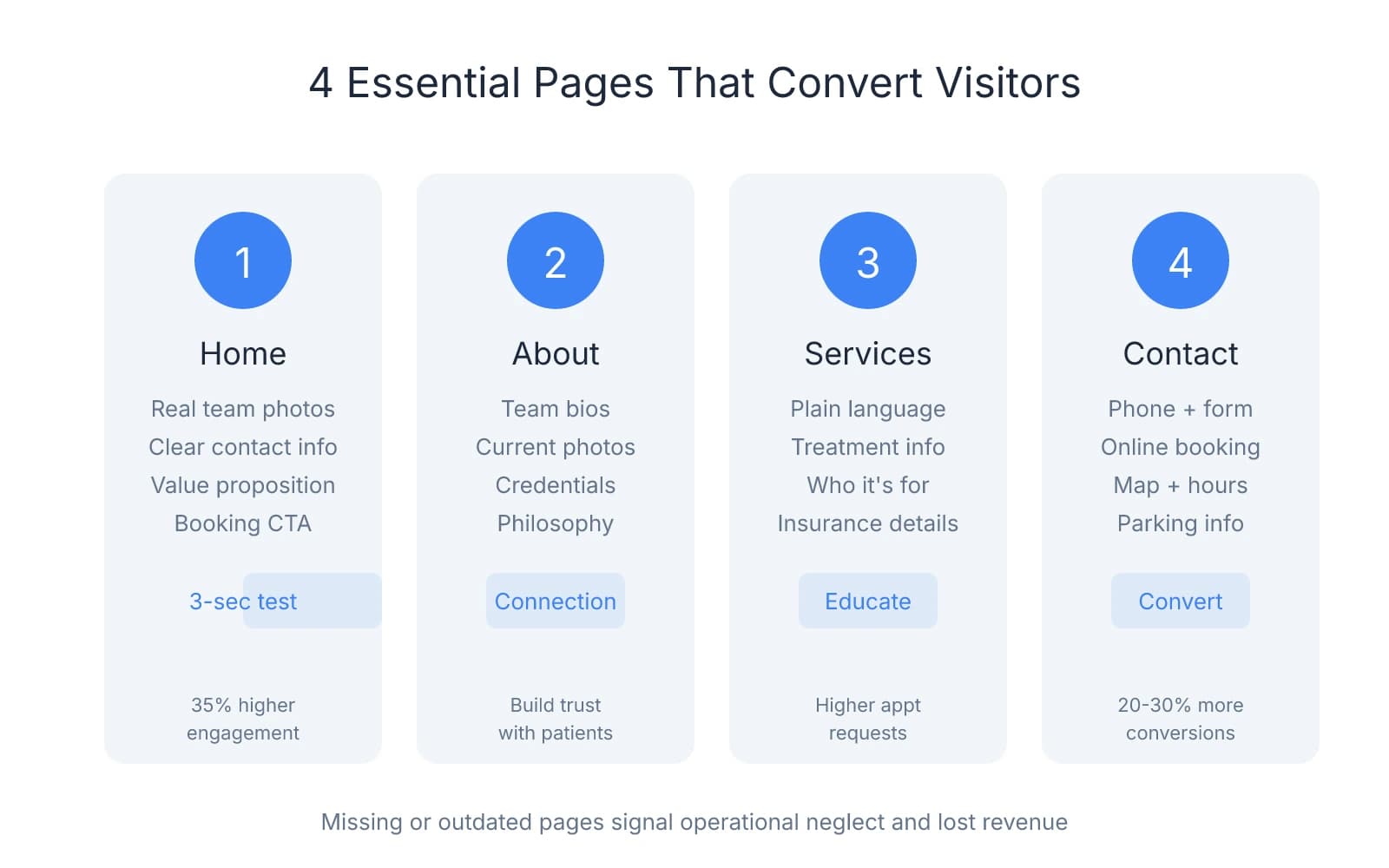
Focus on the four pages that do the actual work of converting visitors into booked appointments: Home, About, Services, and Contact. These aren't informational placeholders—they're conversion tools. Well-structured core pages signal the practice understands patient acquisition. Missing or poorly executed pages tell you the opposite.
Home Page: The Three-Second Trust Test
The home page needs to establish credibility before a visitor scrolls. That means real team photos—not stock images—visible contact information, and a clear value proposition within the first screen. Practices that display authentic team photos see 35% higher engagement than those using generic imagery.
Look for a prominent phone number in the header and at least one clear call-to-action, whether "Book Online" or "New Patient Special." If you have to hunt for how to contact the office, so will prospective patients. Many practices bury their phone number in the footer or hide booking options behind multiple clicks—that's friction you'll inherit and need to fix immediately.
Check whether the home page communicates what makes this practice different. Generic language like "We provide quality care in a comfortable environment" tells you nothing. Specifics matter: "Same-day emergency appointments" or "Sedation dentistry for anxious patients" or "Spanish-speaking staff" give visitors a reason to choose this practice over the one down the street. Vague messaging usually means the seller hasn't thought through positioning, which often correlates with inconsistent patient acquisition.
About Page: Where Connection Happens or Doesn't
The About page should introduce the team with individual bios, credentials, and enough personality to make them feel human. Patients want to know if they'll feel comfortable in the chair. A bio that mentions the dentist's family, hobbies, or community involvement builds connection. Generic paragraphs copied from a template do the opposite.
Pay attention to photos. If the team page shows outdated headshots or includes staff who no longer work there, that's a red flag for operational neglect. It creates confusion for patients who show up expecting to see someone who left months ago. Worse, it suggests the practice hasn't updated other patient-facing information either—insurance panels, hours, or service offerings may also be stale.
Look for a practice philosophy section that goes beyond platitudes. "We treat every patient like family" is meaningless without specifics. Better: "We block 60-minute appointments for new patients so we can answer questions without rushing" or "We call every patient the day after a procedure to check in." Concrete details signal a practice that's thought through patient experience. Their absence suggests the seller hasn't prioritized it, which often shows up in retention numbers during due diligence.
Services Pages: Patient-Friendly Language, Not Clinical Jargon
Services pages should describe treatments in terms patients understand. "We offer full-mouth rehabilitation" means nothing to someone searching for help with missing teeth. "We replace missing teeth with implants, bridges, or dentures—here's how to choose" gives them a path forward.
Each service should include a brief explanation of what the treatment involves, who it's for, and what happens next. If the page just lists procedure names without context—"Endodontics," "Periodontics," "Prosthodontics"—you're looking at a site built for dentists, not patients. Practices that explain treatments in accessible language see higher appointment requests because visitors feel informed rather than intimidated.
Check whether insurance information appears on the services pages. Many practices bury insurance details or omit them entirely, forcing patients to call just to find out if their plan is accepted. A simple "We accept most PPO plans—call to verify your coverage" removes a barrier. If it's missing, add it to your post-closing content update list.
Contact Page: Multiple Pathways to Book
The Contact page should offer at least three ways to reach the office: phone, online form, and ideally online scheduling. Practices with integrated booking systems convert 20-30% more website visitors than phone-only offices, because they remove the barrier of calling during business hours.
Look for a map with the office location, parking instructions, and accessibility details. If the practice is in a multi-tenant building or has tricky parking, those details matter. Patients who can't find the office or don't know where to park are more likely to cancel or no-show.
Hours should be prominently displayed, along with emergency contact information if the practice offers after-hours care. If the hours listed don't match what you saw during your site visit, that's another signal of neglect—and another item you'll need to correct immediately after closing.
What Missing or Outdated Pages Tell You
Gaps in these core pages aren't just aesthetic problems—they're diagnostic. A practice with a strong About page but no Services detail likely relies on referrals rather than search traffic. A site with great service descriptions but no online booking may serve an older demographic that prefers phone contact. Neither is inherently bad, but both shape the patient base you're acquiring and the work you'll need to do post-closing.
Outdated content is often the easiest fix and the fastest win. Updating team bios, refreshing service descriptions, and adding online scheduling can improve conversion rates within weeks. But if the core pages are fundamentally broken—missing entirely, filled with placeholder text, or structured in ways that confuse rather than guide—you're looking at a more significant rebuild. Factor that time and cost into your transition planning, especially if patient acquisition has been declining and the website is part of the reason why. For practices where staff turnover has been high, outdated team pages may also signal broader retention issues you'll need to address, as discussed in strategies for keeping staff after acquisition.
Functional Features That Remove Barriers to Booking
The gap between website traffic and scheduled appointments often comes down to friction. A practice can rank well in search results and have a polished homepage, but if booking an appointment requires three phone calls during business hours, many visitors will move on to a competitor. The functional features you evaluate during due diligence—online scheduling, digital forms, transparent insurance information, and trust signals—directly determine how many prospective patients convert.
Online Booking Captures Revenue Outside Business Hours
Seventy-seven percent of patients want to book appointments online, yet only 40% of dental practices offer this option. That gap represents both a competitive advantage and a patient expectation you'll need to meet. Practices with online scheduling don't just offer convenience—they capture appointment requests that would otherwise be lost. Someone searching for a dentist at 9 PM isn't going to call and leave a voicemail. They're going to book with whichever practice lets them schedule immediately.
The operational benefit extends beyond after-hours traffic. Practices using online booking see 15-30% fewer no-shows through automated reminder systems that send confirmation texts and emails. That's not just a scheduling convenience—it's a revenue protection mechanism. Every unfilled chair represents lost production, and automated reminders reduce the likelihood that patients forget or fail to cancel in advance.
When evaluating a practice's booking system, check whether it integrates with the existing practice management software or operates as a standalone tool. Standalone systems create duplicate data entry and increase the risk of scheduling conflicts. Integrated systems sync in real time, so appointments booked online appear immediately in the schedule your front desk staff sees. If the practice uses a booking tool that doesn't integrate, factor in either the cost of switching to a compatible system or the ongoing administrative burden of manual reconciliation. For practices where you're planning broader software changes, this consideration ties directly into what you'll face during practice management software conversion.
Digital Patient Forms Streamline Intake
The absence of digital patient forms tells you something about the practice's administrative efficiency. Practices that still rely on clipboard-and-pen intake forms create unnecessary work for both staff and patients. New patients arrive early to fill out paperwork, front desk staff manually enter that information into the system, and the process introduces transcription errors that slow down care.
Digital forms allow patients to complete intake paperwork before they arrive, often from the same confirmation email that reminds them of their appointment. That means they walk in ready for their appointment, not sitting in the waiting room with a pen. For your staff, it means the information is already in the system, reducing data entry and freeing up time for patient interaction.
When you evaluate whether a practice has digital forms, check how they're delivered. Some systems email a link automatically after booking. Others require staff to manually send the forms, which introduces inconsistency. The best implementations tie form completion to appointment confirmation, so patients can't confirm without submitting their intake information. If the practice doesn't have digital forms at all, that's an administrative burden you'll inherit and an immediate opportunity to improve patient experience post-closing.
Insurance Transparency Removes a Major Booking Barrier
One of the most common reasons prospective patients abandon a website without booking is uncertainty about insurance coverage. If the site doesn't list accepted plans or explain payment options, many visitors assume the practice doesn't take their insurance and move on without calling.
A simple "Accepted Insurance Plans" section removes this barrier. It doesn't need to be exhaustive, but it should list the major carriers and include a line like "We accept most PPO plans. Call to verify your specific coverage." That gives visitors enough confidence to book while acknowledging that insurance verification happens during intake.
Payment options matter just as much. If the practice offers financing through CareCredit or another provider, that information should be visible on the Contact or Services pages. Patients researching expensive procedures—implants, orthodontics, full-mouth rehabilitation—want to know upfront whether payment plans are available. Burying this information or omitting it entirely creates unnecessary friction and reduces conversion rates for high-value treatments.
When evaluating a practice's insurance transparency, look for both breadth and accuracy. If the site lists plans the practice no longer accepts, or omits major carriers they do accept, that's another signal of neglect. It also creates patient frustration when they show up expecting coverage that doesn't exist, which damages trust and increases the likelihood of cancellations or disputes.
Patient Testimonials and Reviews Build Trust
Trust signals—testimonials, Google reviews integration, credentials display—help prospective patients decide whether to book. A practice with dozens of five-star reviews and patient testimonials embedded on the site converts better than one with no social proof.
Look for practices that display Google reviews directly on the website, not just a link to their Google Business Profile. Embedded reviews create immediate credibility without requiring visitors to leave the site. If the practice has strong reviews but doesn't showcase them, that's a missed conversion opportunity you can fix quickly. If the reviews are weak or nonexistent, that suggests patient satisfaction issues you'll need to address through operational changes, not just website updates.
Credentials and affiliations also matter, particularly for specialists or practices offering advanced procedures. Membership in the American Academy of Cosmetic Dentistry, board certification, or advanced training in implantology signals expertise. These credentials should appear on the About page and, where relevant, on individual service pages.
Integration Determines Whether Features Add Value or Create Work
The most important question when evaluating these features isn't whether they exist—it's whether they integrate with the practice's existing systems. A booking tool that doesn't sync with the practice management software creates duplicate work. Digital forms that require manual data entry defeat the purpose. Payment processing that operates separately from the billing system adds reconciliation steps your staff will need to manage.
During due diligence, ask whether the current systems talk to each other or operate in silos. If the practice uses multiple disconnected tools, you'll either need to consolidate them post-closing or accept the ongoing administrative burden of managing parallel systems. That decision affects both your transition timeline and your operating costs.
Practices with integrated systems signal that the seller invested in infrastructure, not just marketing. Those without integration—or without these features entirely—represent opportunity, but also work. You'll need to implement or upgrade these tools, train staff on new workflows, and manage the transition without disrupting patient care. Build that reality into your post-closing plan and your assessment of what the practice is actually worth.
Legal Requirements and Compliance Considerations
The website you inherit isn't just a marketing asset—it's a legal liability if the seller cut corners on compliance. HIPAA applies to any practice that handles protected health information electronically, which includes contact forms, online booking systems, and patient portals. HIPAA requires encrypted forms, privacy policy disclosure, and secure hosting for any site collecting patient information. A non-compliant website represents risk you assume at closing, and violations can trigger fines starting at $100 per incident.
During due diligence, verify that the site uses SSL encryption—the padlock icon in the browser address bar. If contact forms or booking systems transmit patient data without encryption, that's a HIPAA violation waiting to happen. Check whether the privacy policy includes HIPAA-compliant language about how patient information is collected, used, and protected. Many practice websites either lack a privacy policy entirely or use generic templates that don't address health information handling. Both scenarios expose you to regulatory risk the moment you take ownership.
ADA accessibility standards protect against discrimination claims and expand patient reach to those with disabilities. Websites that aren't accessible to screen readers, keyboard navigation, or users with visual impairments violate the Americans with Disabilities Act. Lawsuits targeting inaccessible dental practice websites have increased in recent years, with settlements often reaching five figures. A practice website that hasn't been built or audited for accessibility represents both legal exposure and a patient population you're unintentionally excluding.
State licensing boards may require specific disclosures on practice websites—dentist license numbers, practice ownership structure, or complaint procedures. Requirements vary by state, so verify compliance with local regulations during your review. Missing disclosures are usually easy to add, but their absence signals that the seller either didn't know the requirements or chose not to follow them. That pattern often extends to other areas of regulatory compliance you'll discover deeper into due diligence, similar to what you might find when evaluating incomplete patient records.
Website compliance isn't just about avoiding fines—it's a diagnostic tool for how seriously the seller took infrastructure investment. A practice with encrypted forms, an updated privacy policy, and accessibility features demonstrates attention to patient-facing systems. One with broken SSL certificates, no privacy disclosure, and inaccessible design suggests the seller deferred digital maintenance along with other operational priorities. When you're deciding whether to move forward or walk away from a deal, the website reveals whether you're acquiring a well-maintained practice or inheriting deferred problems that will cost time and money to resolve.
The website evaluation ties directly into your broader due diligence process. If the digital front door is broken, ask what else has been neglected. Strong websites signal investment in patient acquisition and operational systems. Weak ones reveal where corners were cut. Use that information to assess whether the asking price reflects a practice that's ready to transition or one you'll need to rebuild from the ground up.
Sources & References
The data and claims in this article are drawn from the following sources. We prioritize government data, peer-reviewed research, and established industry publications to ensure accuracy.
- Dental Website Design Ideas: 15 Examples That Convert ...— impact-photography.com
- Dental Website Tweaks That Boost Patient Bookings Fast— dentalfast.coIndustry
- 11 pages that every dental website should have.— dentalmarketo.comIndustry
- Seventy-seven percent of patients want to book appointments online— healthgrades.com
- Real-time Online Scheduling Advantages - PMC - NIH— pmc.ncbi.nlm.nih.govGovernment
- HIPAA | American Dental Association— www.ada.orgIndustry
- HIPAA Rules for Dentists - Updated for 2026— www.hipaajournal.comIndustry
Frequently Asked Questions
Ready to showcase your practice online?
A well-designed website is just the first step in growing your dental practice. Whether you're looking to attract more patients or exploring practice ownership opportunities, Minty can help you build a stronger business foundation.